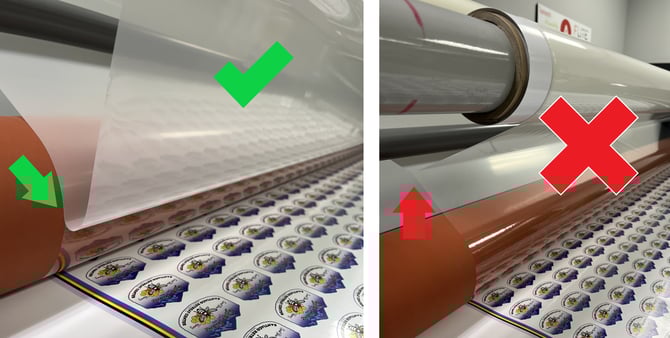
Firstly, silvering does not mean that there is poor overlaminate adhesion. Silvering is the visual effect seen when overlaminating a printed graphic (usually UV-cured inks). This effect usually appears as a silver or hazy effect across the print and is most noticeable over darker colors of the print.
Silvering occurs when tiny air bubbles are captured between adhesive and ink: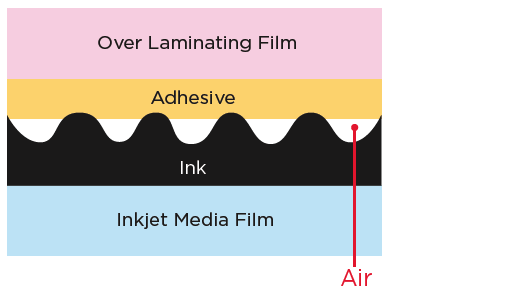
What causes silvering?
- Insufficient roller pressure – Improper downward pressure between the laminator rollers and uneven roller set up (Low cost, hand crank laminators) often cause silvering.
- Laminating speed too high – Lowering the laminator speed allows for more time for pressure to be applied to the laminate, thus sealing the air bubbles on the print. In general, the optimal laminating speed for pressure sensitive laminates is 2-5 ft/min.
- Uneven graphics surface – Uneven graphics surface may be caused by the media (fiber base media, canvas) or ink (UV digital ink, screen printing ink).
- Thinner adhesive coat weight – A thicker adhesive coat weight can fill in the area between the print and the overlaminate.
- Hard adhesive – A softer adhesive can also fill in more of the area between the print and the overlaminate.
- Rigid overlaminate film – A soft overlaminate film can better conform to the topography of the print.
- Low temperature – During the winter, some regions may drop below -32°F. Silvering may occur due to the overlaminate film and adhesive hardening at lower temperatures. Room temperature (74°F) is recommended for printing and laminating.
Adhesive Wet Out on Printed Graphics
In general, the overlaminate's adhesive will wet out overnight on solvent and latex ink printed graphics. However, with the same clear overlaminate, moderate to heavy silvering will initially occur on UV ink due to the matte surface finish.
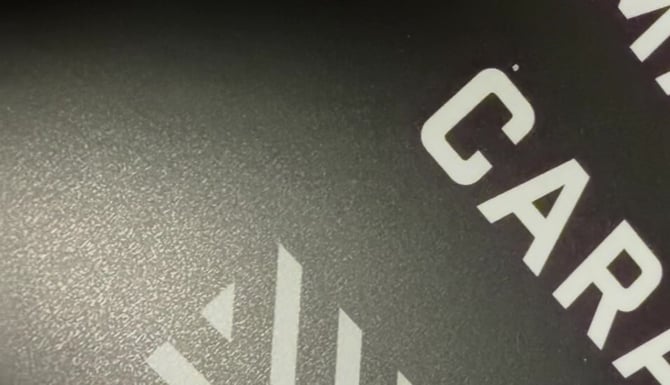
Silvering/Adhesion Test on UV Ink
Today, there are many UV inks on the market, each with distinctive levels of smoothness and surface energy which contribute to overlaminate silvering and lifting. UV inks with a smoother topography and higher surface energy are more ideal for overlaminate compatibility. It is highly recommended to perform peel adhesion tests and silvering analysis of the overlaminate on the UV ink before full-scale production. Even though silvering occurs on UV inks, overlaminates may still adhere well.
Can heat-assisted lamination fix silvering?
Using the heat assist function of a laminator may help minimize the amount of silvering. The recommended settings for heat-assisted lamination are as follows:
- Set the heat setting on the pressure roller at 125°F.
- Increase the roller pressure to at least 50 lbs/in2.
- Slow down the roller speed to 2ft/min.
Note that the guideline above is based on the result obtained from a test laminator model. Your laminator model may require a different setting. Arlon makes no warranties on silvering improvement for hot roll lamination due to UV ink topography.
To minimize stretching the laminate when using the heat assist function, support the overlaminate by separating the liner "on" the nip roller instead of "before".